Showing posts with label Concurrency. Show all posts

Thread Deadlock

Thread deadlock is a hot topic in multi-threading, which makes multi-threading a complex area for beginners. Thread deadlock is a situation, where more than one threads with a shared resource are waiting for other thread(s) to release the lock on that shared resource without doing anything usefully.

This article explains the dead lock using a simple Java application, which simulates a bank transaction.

Create an Account class:
public class Account {
    private final String name;
    private double balance;

    public Account(String name) {
        this.name = name;
    }

    public void withdraw(double amount) {
        this.balance -= amount;
    }

    public void deposit(double amount) {
        this.balance += amount;
    }

    public double getBalance() {
        return this.balance;
    }

    @Override
    public String toString() {
        return name;
    }
}

Create a Transaction class which is a sub class of java.lang.Thread:
public class Transaction extends Thread {
    private final String id;
    private final Account from;
    private final Account to;
    private final double amount;

    public Transaction(String id, Account from, Account to, double amount) {
        this.id = id;
        this.from = from;
        this.to = to;
        this.amount = amount;
    }

    @Override
    public void run() {
        // Acquire the lock of Account 'from'
        synchronized (from) {
            from.withdraw(amount);
            try {
                Thread.sleep(500);
            } catch (InterruptedException e) { }

            // Acquire the lock of Account 'to'
            synchronized (to) {
                to.deposit(amount);
            }
            // Release the lock of Account 'to'
        }
        // Release the lock of Account 'from'
        System.out.println(amount + "is transfered from " + from + " to " + to);
    }
}
Inside the run method, this class synchronizes the 'from' account first and without releasing the lock, it acquires (at least tries to acquire) the lock of 'to' account. Synchronization is the technique of avoiding data corruption or unexpected results in a shared resource environment. For more details about synchronization, visit to this article: Thread Synchronization in Java.

Create a Main class to execute the application:
public class Main {
    public static void main(String[] args) {
        final Account accA = new Account("Acc 1");
        final Account accB = new Account("Acc 2");
        accA.deposit(1000.00);
        accB.deposit(1000.00);

        Transaction t1 = new Transaction("T01", accA, accB, 100.00);
        Transaction t2 = new Transaction("T02", accB, accA, 500.00);

        t1.start();
        t2.start();
    }
}

Suppose there are two customers want to transfer some amount of money to each other from their account at the same time, there is a possibility of getting thread deadlock during this transaction. If you run this program multiple times, sometimes you will not get any outputs in the terminal. Let's analyze the execution of this code into two cases.

Case 1:
Step 1: Transaction 1 starts first, receives the lock of account A and withdraws the money.
Read More

Thread Synchronization in Java

Multi-thread applications are useful to execute more than one operations simultaneously. However, if more than one threads are accessing a shared resource, there is a high risk of data corruption or unexpected result. This article explains the reason for the unexpected results and the possible solution to avoid it.

Even though threads are considered to be executing simultaneously, actually they are executed one after another using a time-sharing mechanism of the underlying operating system. (For more details visit this link). Consider a sample code as shown below.
public class ConcurrencyProblem {
    static int[] array = {0};

    public static void main(String[] args) throws InterruptedException {
        Thread a = new Thread() {
            public void run() {
                for(int i = 1; i <= 1000; i++) {
                    increase();
                }
            }
        };

        Thread b = new Thread() {
            public void run() {
                for(int i = 1; i <= 1000; i++) {
                    decrease();
                }
            }
        };

        a.start();
        b.start();
        a.join();
        b.join();
        System.out.println(array[0]);
    }

    public static void increase() {
        array[0]++;
    }

    public static void decrease() {
        array[0]--;
    }
}
In this code thread A is increasing the value of the first element of the array by one. At the same time, thread B is decreasing the value of the first element of the array by one. Both threads are executing these operations 1000 times. So ideally the final result should be 0 since thread A increases the value 1000 times and thread B decreases the value 1000 times. However, when you run this application, sometimes you may get outputs other than 0. If you run this application, again and again, you will get different outputs on each execution.
Read More

Introduction to Threads

Modern computers have the capability to execute multiple tasks at the same time. Have you ever wondered, how it is achieved in the modern computers only, while older batch processing systems were unable to do so? Early days, processors were able to execute only one process at a time. Programmers fed the problems one after another in a queue to the computer. However, these days we are able to edit a text file while listening a song. In fact still processors can execute a single task at a specific time. Multicore processors have to be considered a set of sub processors; in that case, those sub processors can do one job at a time. Processors are using a technique called time sharing to execute multiple processes at the same time. The basic idea is executing every processes for a limited amount of time only. For example if you are playing a music in VLC player and reading this blog in Firefox, in background your processor is executing the VLC player for few milliseconds and then executing the Firefox for few milliseconds. Not only these two visible applications, all the invisible operating system related processes also running in the same manner. This execution happens cyclic through all the available threads in the system. Humans cannot feel the idle time of processes, because of the high frequency of processors.
Read More

Fork/Join Framework

Java provides a strong multithreading platform to the programmers and time to time it introduces new features. Fork/Join framework is such an enhancement introduced in Java 1.7 to optimize the multicore processors in a multithreading environment. You are required to have basic knowledge of Java Threads in order to understand the Fork/Join framework. Since this topic is much related to the performance of your application, I have provided the specifications of my computer which is used to run the provided codes. To test the real difference between the Fork/Join framework used application and single thread application you need to run the given sample codes in a multicore processor.
  • Processor: Intel(R) Core(TM) i5 CPU 2.53GHz
  • RAM: 6GB of DDR3
  • Operating System: Ubuntu 14.04 x64 bit
  • Java: JDK 1.8 x64 bit
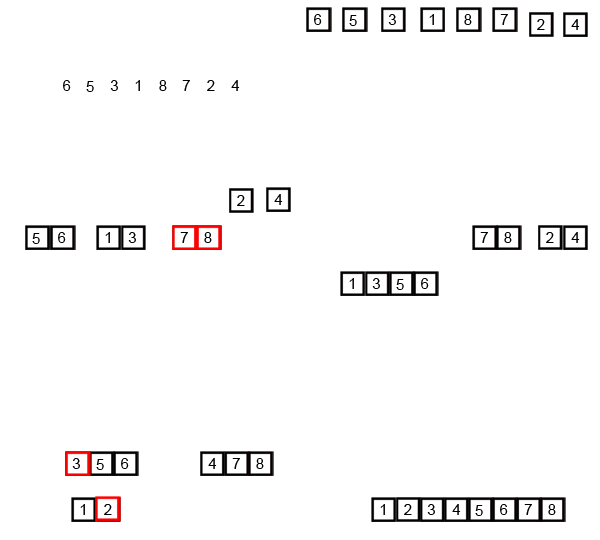
I am using the Merge Sort algorithm to explain the Fork/Join framework concepts, which is a Divide and Conquer algorithm. Divide and conquering is a technique of breaking a problem into its sub set of problems until we reach the simplest form of that problem. Then the problem will be solved recursively by solving sub problems first. For example, to sort an array {6, 5, 3, 1, 8, 7, 2, 4} first we divide it into two pieces {6, 5, 3, 1} and {8, 7, 2, 4}. Then divide it further to get four arrays with two elements on each of them. Continue the same process until you get arrays with single elements. Once you get those arrays, start merging by comparing elements from adjacent arrays.
For further details about Merge Sort: Wikipedia.
Read More

Contact Form

Name

Email *

Message *