Showing posts with label Java. Show all posts

Install Oracle JDK 19 on Linux

Even though OpenJDK is available in Linux repositories, some applications strictly require Oracle Java Development Kit. This article shows you how to manually install Oracle JDK $java_version on your Linux system. This article uses JDK $java_version$java_update_no to demonstrate the installation. In the provided commands, replace the version specific paths and file names according to your downloaded version.

Version specific installation guides are available here:


Install Oracle JDK $java_version on Linux

Oracle provides deb and rpm installers
If your Linux distribution is using DEB package format like Debian, you can download and install the jdk-$java_version_linux-x64_bin.deb file using the following command:
sudo dpkg -i jdk-$java_version_linux-x64_bin.deb
If your  Linux distribution is using RPM package format like Cent OS, you can download and install the jdk-$java_version_linux-x64_bin.rpm file using the following command:
sudo rpm -ivh jdk-$java_version_linux-x64_bin.rpm

However, this article explains the manual installation method which is applicable for all Linux distributions out there. Personally, I prefer the manual installation because I have more control over the changes made in the system.


Read More

Rolling Log Files with Logback

 Imagine you are developing a long running service in Java (most likely you already have one) and found a bug in production at some point, how can you identify the root cause of the bug? The answer is simple: analyze your logs. If you already had your logs written to a file you are in a good position. If not, you may have to rely on the mercy of Docker container logs (if your service is containerized) or else you are doomed. 

Rolling Log Files with Logback

Even if you have logs appended to a log file, you must consider rolling log files to keep them small and concise. If not, be prepared to open a megabyte/gigabyte size file with millions of lines and find a needle in a haystack. Enabling rolling file log in your application is not a big deal if you know the configuration. However finding the right configuration every time you need it requires a lot of web surfing.

Read More

Install Oracle JDK 18 on Linux

Even though OpenJDK is available in Linux repositories, some applications strictly require Oracle Java Development Kit. This article shows you how to manually install Oracle JDK $java_version on your Linux system. This article uses JDK $java_version$java_update_no to demonstrate the installation. In the provided commands, replace the version specific paths and file names according to your downloaded version.

Version specific installation guides are available here:


Install Oracle JDK $java_version on Linux

Oracle provides deb and rpm installers
If your Linux distribution is using DEB package format like Debian, you can download and install the jdk-$java_version_linux-x64_bin.deb file using the following command:
sudo dpkg -i jdk-$java_version_linux-x64_bin.deb
If your  Linux distribution is using RPM package format like Cent OS, you can download and install the jdk-$java_version_linux-x64_bin.rpm file using the following command:
sudo rpm -ivh jdk-$java_version_linux-x64_bin.rpm

However, this article explains the manual installation method which is applicable for all Linux distributions out there. Personally, I prefer the manual installation because I have more control over the changes made in the system.


Read More

Log4J 2.17.0 is Vulnerable to RCE. Upgrade to 2.17.1

I know the wish list of all Java developers for Santa starts with "No more Log4J vulnerabilities". However sometimes even Santa cannot fulfill all your wishes. A new security vulnerability was found in Log4J 2.0-alpha7 to 2.17.0 excluding 2.3.2 and 2.12.4.

The new vulnerability allows Remote Code Execution (RCE) attack where an attacker with permission to modify the logging configuration file can construct a malicious configuration using a JDBC Appender with a data source referencing a JNDI URI which can execute remote code.

Log4J 2.17.0 is Vulnerable to RCE. Upgrade to 2.17.1

Unlike the CVE-2021-44228 that triggered the domino effect of Log4J vulnerabilities, CVE-2021-44832 is marked as a moderated risk since it requires access to your Log4J configuration. For those who don't know, projects using Log4J with the CVE-2021-44228 vulnerability can be exploited by submitting modified HTTP requests. On the other hand, CVE-2021-44832 requires direct access to the Log4J configuration for an outsider. If somebody got the access to your system to modify the Log4J configuration, you are already doomed. Therefore, you may not need to rush to apply the patch if your system is already secure enough.

Similar to CVE-2021-44228 and CVE-2021-45105, CVE-2021-44832 also affects log4j-core only.

The CVE-2021-44832 issue particularly hasn't affect Log4J 1.x versions. However, Log4J 1.x is not maintained anymore and do not expect any security patches in case if a security vulnerability is found in the future. Based on Java versions, upgrade to the latest version with the fix for all known security vulnerabilities so far.

Java VersionLatest Log4J Version
Java 8 and laterLog4j 2.17.1
Java 7Log4j 2.12.4
Java 6Log4j 2.3.2


The latest Log4J versions in the above table have fixed the issue by limiting JNDI data source names to the java protocol.

Let me repeat the process for developers to identify the vulnerable Log4J versions.

Run the following command from your project folder.

mvn dependency:tree

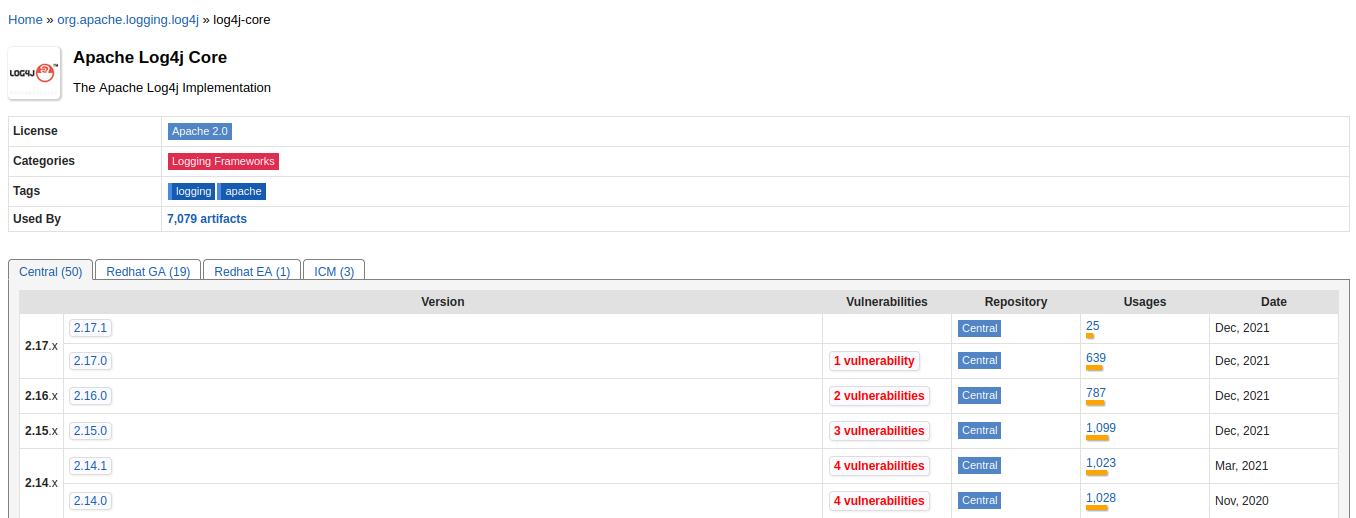
Any Log4J dependency with a version less than 2.17.1 is most likely vulnerable or unmaintained. Maven central repository has a new column with the number of vulnerabilities in each Log4j version.

Log4J 2.17.0 is Vulnerable to RCE. Upgrade to 2.17.1

If you encounter any vulnerable Log4j versions as your direct dependencies defined in your pom file, or in your parent pom file, upgrade them immediately. Remember by defining the following dependency in your pom file, you can override the dependency defined in your parent pom file.

<dependency>
    <groupId>org.apache.logging.log4j</groupId>
    <artifactId>log4j-core</artifactId>
    <version>2.17.1</version>
</dependency>


Log4J 2.17.0 is Vulnerable to RCE. Upgrade to 2.17.1 
Image Credits: Google

A vulnerable Log4J library can be buried under a multi-level dependency tree. If any of your libraries are using a vulnerable dependency, look for their latest fixed versions or talk to your security team.

Read More

Goodbye Log4j

ALERT Dec 16th 2021: How to Fix Log4J Vulnerability.
 
ALERT Dec 18th 2021: Log4J 2.16.0 is vulnerable to DoS attack. Switch to 2.17.0. For more details: Log4J 2.16.0 is Vulnerable to DoS. Switch to 2.17.0.
 
ALERT Dec 29th 2021: Log4J 2.17.0 is vulnerable to RCE attack. Switch to 2.17.1. For more details: Log4J 2.17.0 is Vulnerable to RCE. Upgrade to 2.17.1. 

This article is an old post introducing SLF4J. You can still refer it to learn more about SLF4J. For Log4J vulnerability related posts, check these links:
 
After seeing so many students in last four years, I have decided to write this article about the new loggers which are widely being used by the industry. Almost all the university students I have seen are familiar with Log4j 1.x (at least heard about it) but most of them even did not hear about SLF4J and Logback. The purpose of this article is introducing SLF4J and Logback and convincing you towards them. Before getting into the topic, be informed that Log4j 1.x is not being maintained after August 5, 2015 and Ceki Gülcü the developer of Log4j came up with the new tools SLF4J and Logback. Technically, Logback is an enhanced successor of Log4j and performs better than Log4j.

He did a good job, but we have to move forward.
Read More

Log4J 2.16.0 is Vulnerable to DoS. Upgrade to 2.17.0.

ALERT: Log4J 2.17.0 is vulnerable to RCE attack. Switch to 2.17.1. For more details: Log4J 2.17.0 is Vulnerable to RCE. Upgrade to 2.17.1.

Dear Java Developers, cancel your holiday plans. Another Log4j vulnerability was reported on December 16th Thursday and a new Log4j version is released with the patch on December 18th Saturday. Log4J 2.16.0 is no longer safe.

The new vulnerability independently discovered by Hideki Okamoto of Akamai Technologies, Guy Lederfein of Trend Micro Research working with Trend Micro’s Zero Day Initiative, and another anonymous vulnerability researcher allows denial of service attack on systems using Log4j 2.0-beta9 to 2.16.0. Remember that Log4j 2.16.0 was released last week to fix the CVE-2021-44228 vulnerability and chances are high for most of the Java projects already being upgraded to Log4j 2.16.0 which is vulnerable to DoS attack now.


Log4J 2.16.0 is Vulnerable. Switch to 2.17.0

Similar to the previous vulnerability, the CVE-2021-45105 doesn't mean everyone using Log4j 2.0-beta9 to 2.16.0 is vulnerable. This uncontrolled recursion from self-referential lookups bug affects only if your Log4j configuration has Context Lookups like ${ctx:loginId} or $${ctx:loginId}. Though removing such context lookups where they originate from sources external to the application such as HTTP headers or user input is one way to solve the issue, it is recommended to replace Context Lookups like ${ctx:loginId} or $${ctx:loginId} with Thread Context Map patterns (%X, %mdc, or %MDC). Instead, you can upgrade to the latest Log4j version 2.17.0.

Similar to CVE-2021-44228, CVE-2021-45105 also affects log4j-core only.

Last Friday, Google published a blog post claiming more than 35,000 Java packages in the Maven Central repository are affected by Log4j vulnerability. By the time of publishing that article only 5000 artifacts were patched. That leaves 30,000 packages hanging around with vulnerable Log4j dependency. Google also mentioned that in more than 80% of the packages, the vulnerability is more than one level deep, with a majority affected five levels down (and some as many as nine levels down). This makes fixing them hard as a package maintainer you have to rely on your dependency maintainer to publish a fixed version.

Coming to the projects you have control over, you have to go through the same cycle once more to upgrade all your Log4j dependencies to the latest version 2.17.0.

Let me repeat the process for developers to identify the vulnerable Log4J versions.

Run the following command from your project folder.

mvn dependency:tree

Any Log4J dependency with a version less than 2.17.0 is most likely vulnerable or unmaintained. Maven central repository has a new column with the number of vulnerabilities in each Log4j version.

Log4J 2.16.0 is Vulnerable to DoS. Switch to 2.17.0.

If you encounter any vulnerable Log4j versions as your direct dependencies defined in your pom file, or in your parent pom file, upgrade them immediately. Remember by defining the following dependency in your pom file, you can override the dependency defined in your parent pom file.

<dependency>
    <groupId>org.apache.logging.log4j</groupId>
    <artifactId>log4j-core</artifactId>
    <version>2.17.0</version>
</dependency>


Log4J 2.16.0 is Vulnerable. Switch to 2.17.0 
Image Credits: Google

A vulnerable Log4J library can be buried under a multi-level dependency tree. If any of your libraries are using a vulnerable dependency, look for their latest fixed versions or talk to your security team.

Read More

How to Fix Log4J Vulnerability

ALERT 1: Log4J 2.16.0 is vulnerable to DoS attack. Switch to 2.17.0. For more details: Log4J 2.16.0 is Vulnerable to DoS. Switch to 2.17.0.


ALERT 2: Log4J 2.17.0 is vulnerable to RCE attack. Switch to 2.17.1. For more details: Log4J 2.17.0 is Vulnerable to RCE. Upgrade to 2.17.1.


Log4j security vulnerability has stolen the sleep of developers over the last week. Though it is a little late, this article explains how to identify if your project is using Log4j and how to fix the problem. Let's start with the problem description: In Apache Log4j2 versions up to and including 2.14.1 (excluding security release 2.12.2), the JNDI features used in configurations, log messages, and parameters do not protect against attacker-controlled LDAP and other JNDI related endpoints. An attacker who can control log messages or log message parameters can execute arbitrary code loaded from LDAP servers when message lookup substitution is enabled.

How to fix Log4J Vulnerability


Note that only the log4j-core JAR file is impacted by this vulnerability. Applications using only the log4j-api JAR file without the log4j-core JAR file are not impacted by this vulnerability.


Though the Log4j you are using in your project is vulnerable doesn't mean that your project is vulnerable. If you are behind a firewall with no external access or if you don't log any user inputs, chances to attack your system are slim. However, it doesn't mean you can relax since it is always a best practice to fix vulnerabilities in the project regardless of whether you are affected or not.


Read More

Install Oracle JDK 17 on Linux

Even though OpenJDK is available in Linux repositories, some applications strictly require Oracle Java Development Kit. This article shows you how to manually install Oracle JDK $java_version on your Linux system. This article uses JDK $java_version$java_update_no to demonstrate the installation. In the provided commands, replace the version specific paths and file names according to your downloaded version.

Version specific installation guides are available here:


Install Oracle JDK $java_version on Linux

Oracle provides deb and rpm installers
If your Linux distribution is using DEB package format like Debian, you can download and install the jdk-$java_version_linux-x64_bin.deb file using the following command:
sudo dpkg -i jdk-$java_version_linux-x64_bin.deb
If your  Linux distribution is using RPM package format like Cent OS, you can download and install the jdk-$java_version_linux-x64_bin.rpm file using the following command:
sudo rpm -ivh jdk-$java_version_linux-x64_bin.rpm

However, this article explains the manual installation method which is applicable for all Linux distributions out there. Personally, I prefer the manual installation because I have more control over the changes made in the system.


Read More

Install Oracle JDK 16 on Linux

Even though OpenJDK is available in Linux repositories, some applications strictly require Oracle Java Development Kit. This article shows you how to manually install Oracle JDK $java_version on your Linux system. This article uses JDK $java_version$java_update_no to demonstrate the installation. In the provided commands, replace the version specific paths and file names according to your downloaded version.

Version specific installation guides are available here:


Install Oracle JDK $java_version on Linux

Oracle provides deb and rpm installers
If your Linux distribution is using DEB package format like Debian, you can download and install the jdk-$java_version$java_update_no_linux-x64_bin.deb file using the following command:
sudo dpkg -i jdk-$java_version$java_update_no_linux-x64_bin.deb
If your  Linux distribution is using RPM package format like Cent OS, you can download and install the jdk-$java_version$java_update_no_linux-x64_bin.rpm file using the following command:
sudo rpm -ivh jdk-$java_version$java_update_no_linux-x64_bin.rpm

However, this article explains the manual installation method which is applicable for all Linux distributions out there. Personally, I prefer the manual installation because I have more control over the changes made in the system.


Read More

Java is Dead! Once More

Programming languages are ranked based on different criteria. For example, Stack Overflow lists programming languages based on the number of questions and answers; while it is a clear indication of the recent popularity of a language, already matured languages not necessarily require the developers to search for "how to write a loop". Similarly, the famous index Tiobe lists Java as the second most popular language next to C at the time of writing this article. Tiboe ranks programming languages based on the number of skilled engineers world-wide, courses, and third-party vendors. Popular search engines such as Google, Bing, Yahoo!, Wikipedia, Amazon, YouTube, and Baidu are used to calculate the ratings. It is important to note that the TIOBE index is not about the best programming language or the language in which most lines of code have been written.


Coming to the point, recently I saw an index claiming Python took the first place pushing Java to the second place. Nothing to worry; good for Python! The programming language war is never-ending like the Linux distribution war. Fanboys always claim that their language is superior to any other language. This article analyzes if Java is dying and is Python replacing Java so that you can learn and live with Python only. I am comparing Python against Java because of the most recent claims I've seen over the internet but the core idea remains the same for any language out there.


Read More

Install the Latest Oracle JDK on Mac

This article shows you how to install Oracle JDK $java_version on your Mac system. This article uses JDK $java_version$java_update_no to demonstrate the installation. In the provided commands, replace the version specific paths and file names according to the downloaded version.

Oracle provides a Mac installer and a binary file.This article explains how to install Oracle JDK using the mac installer and how to set the JAVA_HOME variable.

Install Oracle JDK $java_version on Linux

Read More

13 Things To Do After Installing IntelliJ Idea

IntelliJ Idea: the famous IDE for JVM languages including Java, Scala, and Kotlin. If you don't have it installed, follow Install IntelliJ IDEA on Linux to install the latest IntelliJ Idea. This article shows you some hidden tweaks to boost your productivity with IntelliJ Idea.

Wait! Isn't IntelliJ Idea ready to be used out of the box? There is no doubt about the capability of IntelliJ Idea; of course, it can handle your project without any tweaks and customization. However, this article shows you how I customize my IntelliJ Idea for better productivity. All we going to do is enabling some hidden features and installing some plugins that may take your favorite IDE to the next level.

Though I specifically mention the IntelliJ Idea, the following tweaks apply to all Jetbrains' IDEs:

  • Android Studio
  • AppCode
  • CLion
  • GoLand
  • PhpStorm
  • PyCharm
  • Rider
  • RubyMine
  • WebStorm

1. Enable the toolbar

Go to View → Appearance and select Toolbar

The toolbar provides quick access to frequently used buttons such as Save All, Back, and Forward with a cost of small vertical space. I prefer to have the toolbar enabled because it moves the Build button to the left that makes it easy to access using my muscle memory. In addition, you can add more shortcuts to this toolbar if you like.

IntelliJ IDEA Enable Toolbar

Read More

Install Oracle JDK 15 on Linux


Even though OpenJDK is available in Linux repositories, some applications strictly require Oracle Java Development Kit. This article shows you how to manually install Oracle JDK $java_version on your Linux system. This article is using JDK $java_version$java_update_no to demonstrate the installation. In the provided commands, replace the version specific paths and file names according to your downloaded version.

Version specific installation guides are available here:

Install Oracle JDK $java_version on Linux

Oracle provides deb and rpm installers
If your Linux distribution is using DEB package format like Debian, you can download and install the jdk-$java_version$java_update_no_linux-x64_bin.deb file using the following command:
sudo dpkg -i jdk-$java_version$java_update_no_linux-x64_bin.deb
If your  Linux distribution is using RPM package format like Cent OS, you can download and install the jdk-$java_version$java_update_no_linux-x64_bin.rpm file using the following command:
sudo rpm -ivh jdk-$java_version$java_update_no_linux-x64_bin.rpm

However, this article explains the manual installation method which is applicable for all Linux distributions out there. Personally, I prefer the manual installation because I have more control over the changes made in the system.


Read More

Read and Write ORC Files in Core Java

The Optimized Row Columnar (ORC) file format provides a highly efficient way to store Hive data. It was designed to overcome the limitations of the other Hive file formats. Using ORC files improves performance when Hive is reading, writing, and processing data. There are hundreds of computing engine from Hive to Presto to read and write ORC files. When it comes to reading or writing ORC files using core Java, there is no enough help except the official document. This article is for you if you are looking forward to writing your own code to read or write ORC files.
 
In this article, we will create a simple ORC writer and reader to write ORC files and to read from ORC files. Later the ORC writer and the reader will be enhanced to support any common ORC types with some minor optimizations.

Read and Write ORC Files in Core Java

Requirements:
Read More

Install Oracle JDK 14 on Linux


Even though OpenJDK is available in Linux repositories, some applications strictly require Oracle Java Development Kit. This article shows you how to manually install Oracle JDK $java_version on your Linux system. This article is using JDK 14$java_update_no to demonstrate the installation. In the provided commands, replace the version specific paths and file names according to your downloaded version.

Oracle JDK 14 is no longer supported. Please consider installing an LTS version or the latest Oracle JDK
Version specific installation guides are available here:
Oracle provides deb and rpm installers
If your Linux distribution is using DEB package format like Debian, you can download and install the jdk-$java_version$java_update_no_linux-x64_bin.deb file using the following command:
sudo dpkg -i jdk-$java_version$java_update_no_linux-x64_bin.deb
If your  Linux distribution is using RPM package format like Cent OS, you can download and install the jdk-$java_version$java_update_no_linux-x64_bin.rpm file using the following command:
sudo rpm -ivh jdk-$java_version$java_update_no_linux-x64_bin.rpm

However, this article explains the manual installation method which is applicable for all Linux distributions out there. Personally, I prefer the manual installation because I have more control over the changes made in the system.

Install Oracle JDK $java_version on Linux

Read More

Install the latest Oracle JDK on Linux

Even though OpenJDK is available in Linux repositories, some applications strictly require Oracle Java Development Kit. This article shows you how to manually install Oracle JDK $java_version on your Linux system. This article uses JDK $java_version$java_update_no to demonstrate the installation. In the provided commands, replace the version specific paths and file names according to your downloaded version.

Version specific installation guides are available here:


Install Oracle JDK $java_version on Linux

Oracle provides deb and rpm installers
If your Linux distribution is using DEB package format like Debian, you can download and install the jdk-$java_version_linux-x64_bin.deb file using the following command:
sudo dpkg -i jdk-$java_version_linux-x64_bin.deb
If your  Linux distribution is using RPM package format like Cent OS, you can download and install the jdk-$java_version_linux-x64_bin.rpm file using the following command:
sudo rpm -ivh jdk-$java_version_linux-x64_bin.rpm

However, this article explains the manual installation method which is applicable for all Linux distributions out there. Personally, I prefer the manual installation because I have more control over the changes made in the system.


Read More
Smelly instanceof Operator

Smelly instanceof Operator

The instanceof operator in Java is used to check if a given reference is an instance of (aka object of) a given class. Though it is useful in some situations, it is a bad practice to use the instanceof operator. Whenever I see instanceof in my student's projects or a code review I raise the alarm. This article explains why the instanceof operator is considered a bad practice and how to avoid it.
Read More

Presto SQL: Join Algorithms

Presto is a distributed big data SQL engine initially developed by Facebook and later open-sourced and being led by the community. The last article Presto SQL: Types of Joins covers the fundamentals of join operators available in Presto and how they can be used in SQL queries. With that knowledge, you can now learn the internals of Presto and how it executes join operations internally. This article presents how Presto executes join operations and the algorithms used to join tables.


Read More

ANTLR Hello World! - Arithmetic Expression Parser

ANTLR Hello World! - Arithmetic Expression Parser

Ever wondered how all these programming languages understand what you write? This article reveals the truth: Language Parsing. It is often referred to as parsing, syntax analysis, or syntactic analysis. Regardless of the term, it is the process of analyzing a string of symbols, either in natural language, computer languages or data structures, conforming to the rules of a formal grammar. The following diagram depicts the language parsing process:

Language Parser

As you can see, the Language Parser (which is part of the compiler) takes an input (which is the source code), validates it against the Language Grammar and produces an Abstract Syntax Tree (commonly known as AST which is representing the source code in a tree structure).

ANTLR (ANother Tool for Language Recognition) is a tool to define such grammar and to build a parser automatically using that grammar. It also provides two high-level design patterns to analyze the AST: Visitor and Listener. ANTLR is being used by several languages and frameworks including Ballerina, Siddhi, and Presto SQL. This article introduces ANTLR to you using a hello world application to evaluate basic mathematical expressions as a string.

Read More

Contact Form

Name

Email *

Message *