Showing posts with label Java. Show all posts

Install Oracle JDK 19 on Linux

Even though OpenJDK is available in Linux repositories, some applications strictly require Oracle Java Development Kit. This article shows you how to manually install Oracle JDK $java_version on your Linux system. This article uses JDK $java_version$java_update_no to demonstrate the installation. In the provided commands, replace the version specific paths and file names according to your downloaded version.

Version specific installation guides are available here:


Install Oracle JDK $java_version on Linux

Oracle provides deb and rpm installers
If your Linux distribution is using DEB package format like Debian, you can download and install the jdk-$java_version_linux-x64_bin.deb file using the following command:
sudo dpkg -i jdk-$java_version_linux-x64_bin.deb
If your  Linux distribution is using RPM package format like Cent OS, you can download and install the jdk-$java_version_linux-x64_bin.rpm file using the following command:
sudo rpm -ivh jdk-$java_version_linux-x64_bin.rpm

However, this article explains the manual installation method which is applicable for all Linux distributions out there. Personally, I prefer the manual installation because I have more control over the changes made in the system.


Read More

Rolling Log Files with Logback

 Imagine you are developing a long running service in Java (most likely you already have one) and found a bug in production at some point, how can you identify the root cause of the bug? The answer is simple: analyze your logs. If you already had your logs written to a file you are in a good position. If not, you may have to rely on the mercy of Docker container logs (if your service is containerized) or else you are doomed. 

Rolling Log Files with Logback

Even if you have logs appended to a log file, you must consider rolling log files to keep them small and concise. If not, be prepared to open a megabyte/gigabyte size file with millions of lines and find a needle in a haystack. Enabling rolling file log in your application is not a big deal if you know the configuration. However finding the right configuration every time you need it requires a lot of web surfing.

Read More

Install Oracle JDK 18 on Linux

Even though OpenJDK is available in Linux repositories, some applications strictly require Oracle Java Development Kit. This article shows you how to manually install Oracle JDK $java_version on your Linux system. This article uses JDK $java_version$java_update_no to demonstrate the installation. In the provided commands, replace the version specific paths and file names according to your downloaded version.

Version specific installation guides are available here:


Install Oracle JDK $java_version on Linux

Oracle provides deb and rpm installers
If your Linux distribution is using DEB package format like Debian, you can download and install the jdk-$java_version_linux-x64_bin.deb file using the following command:
sudo dpkg -i jdk-$java_version_linux-x64_bin.deb
If your  Linux distribution is using RPM package format like Cent OS, you can download and install the jdk-$java_version_linux-x64_bin.rpm file using the following command:
sudo rpm -ivh jdk-$java_version_linux-x64_bin.rpm

However, this article explains the manual installation method which is applicable for all Linux distributions out there. Personally, I prefer the manual installation because I have more control over the changes made in the system.


Read More

Log4J 2.17.0 is Vulnerable to RCE. Upgrade to 2.17.1

I know the wish list of all Java developers for Santa starts with "No more Log4J vulnerabilities". However sometimes even Santa cannot fulfill all your wishes. A new security vulnerability was found in Log4J 2.0-alpha7 to 2.17.0 excluding 2.3.2 and 2.12.4.

The new vulnerability allows Remote Code Execution (RCE) attack where an attacker with permission to modify the logging configuration file can construct a malicious configuration using a JDBC Appender with a data source referencing a JNDI URI which can execute remote code.

Log4J 2.17.0 is Vulnerable to RCE. Upgrade to 2.17.1

Unlike the CVE-2021-44228 that triggered the domino effect of Log4J vulnerabilities, CVE-2021-44832 is marked as a moderated risk since it requires access to your Log4J configuration. For those who don't know, projects using Log4J with the CVE-2021-44228 vulnerability can be exploited by submitting modified HTTP requests. On the other hand, CVE-2021-44832 requires direct access to the Log4J configuration for an outsider. If somebody got the access to your system to modify the Log4J configuration, you are already doomed. Therefore, you may not need to rush to apply the patch if your system is already secure enough.

Similar to CVE-2021-44228 and CVE-2021-45105, CVE-2021-44832 also affects log4j-core only.

The CVE-2021-44832 issue particularly hasn't affect Log4J 1.x versions. However, Log4J 1.x is not maintained anymore and do not expect any security patches in case if a security vulnerability is found in the future. Based on Java versions, upgrade to the latest version with the fix for all known security vulnerabilities so far.

Java VersionLatest Log4J Version
Java 8 and laterLog4j 2.17.1
Java 7Log4j 2.12.4
Java 6Log4j 2.3.2


The latest Log4J versions in the above table have fixed the issue by limiting JNDI data source names to the java protocol.

Let me repeat the process for developers to identify the vulnerable Log4J versions.

Run the following command from your project folder.

mvn dependency:tree

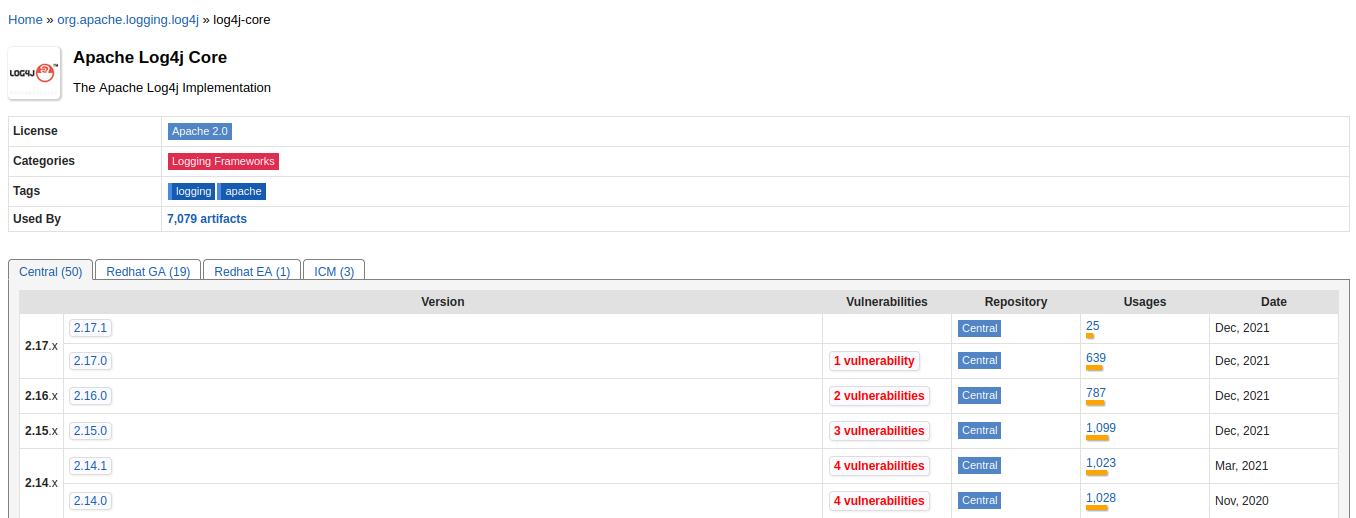
Any Log4J dependency with a version less than 2.17.1 is most likely vulnerable or unmaintained. Maven central repository has a new column with the number of vulnerabilities in each Log4j version.

Log4J 2.17.0 is Vulnerable to RCE. Upgrade to 2.17.1

If you encounter any vulnerable Log4j versions as your direct dependencies defined in your pom file, or in your parent pom file, upgrade them immediately. Remember by defining the following dependency in your pom file, you can override the dependency defined in your parent pom file.

<dependency>
    <groupId>org.apache.logging.log4j</groupId>
    <artifactId>log4j-core</artifactId>
    <version>2.17.1</version>
</dependency>


Log4J 2.17.0 is Vulnerable to RCE. Upgrade to 2.17.1 
Image Credits: Google

A vulnerable Log4J library can be buried under a multi-level dependency tree. If any of your libraries are using a vulnerable dependency, look for their latest fixed versions or talk to your security team.

Read More

Goodbye Log4j

ALERT Dec 16th 2021: How to Fix Log4J Vulnerability.
 
ALERT Dec 18th 2021: Log4J 2.16.0 is vulnerable to DoS attack. Switch to 2.17.0. For more details: Log4J 2.16.0 is Vulnerable to DoS. Switch to 2.17.0.
 
ALERT Dec 29th 2021: Log4J 2.17.0 is vulnerable to RCE attack. Switch to 2.17.1. For more details: Log4J 2.17.0 is Vulnerable to RCE. Upgrade to 2.17.1. 

This article is an old post introducing SLF4J. You can still refer it to learn more about SLF4J. For Log4J vulnerability related posts, check these links:
 
After seeing so many students in last four years, I have decided to write this article about the new loggers which are widely being used by the industry. Almost all the university students I have seen are familiar with Log4j 1.x (at least heard about it) but most of them even did not hear about SLF4J and Logback. The purpose of this article is introducing SLF4J and Logback and convincing you towards them. Before getting into the topic, be informed that Log4j 1.x is not being maintained after August 5, 2015 and Ceki Gülcü the developer of Log4j came up with the new tools SLF4J and Logback. Technically, Logback is an enhanced successor of Log4j and performs better than Log4j.

He did a good job, but we have to move forward.
Read More

Contact Form

Name

Email *

Message *