Showing posts with label Apache. Show all posts

Run Apache NiFi Docker on Mac M1

In my recent articles on Apache NiFi, I explained how to run Apache NiFi on Docker and Docker Compose. Recently I got a Mac Book M1 Pro machine from work and surprisingly I couldn't run Apache NiFi on Docker in Mac Book M1. Though the Apache NiFi binary deployment works fine on Mac M1 architecture, the official Apache NiFi Docker image does not support Mac M1 yet (at the time of writing this article). However, Chris Sampson a NiFi committer provided a script to build NiFI docker image that is compatible with Mac M1. This article explains, how to build Apache NiFi docker image on your Mac Book M1 and how to run it.

Disclaimer: Since this is not an official image, I recommend this method only for pipeline development and testing purposes.

Run Apache NiFi in Docker with SSL Enabled
Read More

Run Apache NiFi Cluster in Docker with SSL Enabled

Welcome to the fourth article in the series of Apache NiFi. The last article explained how to set up an Apache NiFi Docker container with a self-signed SSLcertificate. This article addresses the next pain point: how to create an Apache NiFi cluster in Docker with SSL enabled. Unlike HTTP cluster, setting up Apache NiFi cluster with SSL enabled in Docker introduces a new challenge: Hostname verification.

For added security, if HTTPS connection is enabled, Apache NiFi will verify the Hostname of requests. Therefore each request sent to Apache NiFi must have a predefined hostname. Not only the external requests, but peer-to-peer communication of NiFi nodes in a cluster also go through HTTPS and are subject to hostname verification. If the hostname provided in the HTTPS request does not match the hostname defined in the SSL certificate, NiFi will throw a javax.net.ssl.SSLPeerUnverifiedException.
Run Apache NiFi in Docker with SSL Enabled
If you are traditionally deploying Apache NiFi: individual servers with known IP addresses, it is easy to create certificates with those IP addresses. However, in a dynamic environment like Docker, the hostname of a container is defined at the runtime if you need flexible scaling options. Since Docker doesn't provide an option to define the hostname pattern in a scalable cluster, we have to stick to hard-coded Apache NiFi containers with predefined hostnames to create a cluster. The disadvantage of this method is that it is hard to scale up/down a cluster with hard-coded containers. Instead, you can also set up an HTTP cluster and create a load balancer with HTTPS frontend and SSL Termination between the client and NiFi UI. However, in this article, we will stick to the SSL configuration at the cluster level.
Read More

Run Apache NiFi in Docker with SSL Enabled

The last two articles in the Apache NiFi series discussed how to run Apache NiFi standalone server and NiFi cluster in Docker. However, those are far from production-ready because they are not secured. The next step in setting up a secured NiFi cluster is spinning up an Apache NiFi instance with SSL enabled in Docker. Though we are moving towards production-ready, this article will use self-signed certificates. In production, you should not use a self-signed certificate. In addition, you may also require additional safety measures like firewall and proxy.
Run Apache NiFi in Docker with SSL Enabled
Read More

Run Apache NiFi Cluster in Docker

The last article on Apache NiFi: Run Apache NiFi in Docker was for those who want to start playing with Apache NiFi. Though it was a good start to play with NiFi, it is far from production deployment. This article introduces the second stage of deployment: a NiFi cluster running in Docker using Docker Compose.

Run Apache NiFi in Docker

To begin with, you must have Docker installed in your system and also install Docker Compose as we are going to use Docker Compose to setup the Apache NiFi cluster. 

Read More

Log4J 2.17.0 is Vulnerable to RCE. Upgrade to 2.17.1

I know the wish list of all Java developers for Santa starts with "No more Log4J vulnerabilities". However sometimes even Santa cannot fulfill all your wishes. A new security vulnerability was found in Log4J 2.0-alpha7 to 2.17.0 excluding 2.3.2 and 2.12.4.

The new vulnerability allows Remote Code Execution (RCE) attack where an attacker with permission to modify the logging configuration file can construct a malicious configuration using a JDBC Appender with a data source referencing a JNDI URI which can execute remote code.

Log4J 2.17.0 is Vulnerable to RCE. Upgrade to 2.17.1

Unlike the CVE-2021-44228 that triggered the domino effect of Log4J vulnerabilities, CVE-2021-44832 is marked as a moderated risk since it requires access to your Log4J configuration. For those who don't know, projects using Log4J with the CVE-2021-44228 vulnerability can be exploited by submitting modified HTTP requests. On the other hand, CVE-2021-44832 requires direct access to the Log4J configuration for an outsider. If somebody got the access to your system to modify the Log4J configuration, you are already doomed. Therefore, you may not need to rush to apply the patch if your system is already secure enough.

Similar to CVE-2021-44228 and CVE-2021-45105, CVE-2021-44832 also affects log4j-core only.

The CVE-2021-44832 issue particularly hasn't affect Log4J 1.x versions. However, Log4J 1.x is not maintained anymore and do not expect any security patches in case if a security vulnerability is found in the future. Based on Java versions, upgrade to the latest version with the fix for all known security vulnerabilities so far.

Java VersionLatest Log4J Version
Java 8 and laterLog4j 2.17.1
Java 7Log4j 2.12.4
Java 6Log4j 2.3.2


The latest Log4J versions in the above table have fixed the issue by limiting JNDI data source names to the java protocol.

Let me repeat the process for developers to identify the vulnerable Log4J versions.

Run the following command from your project folder.

mvn dependency:tree

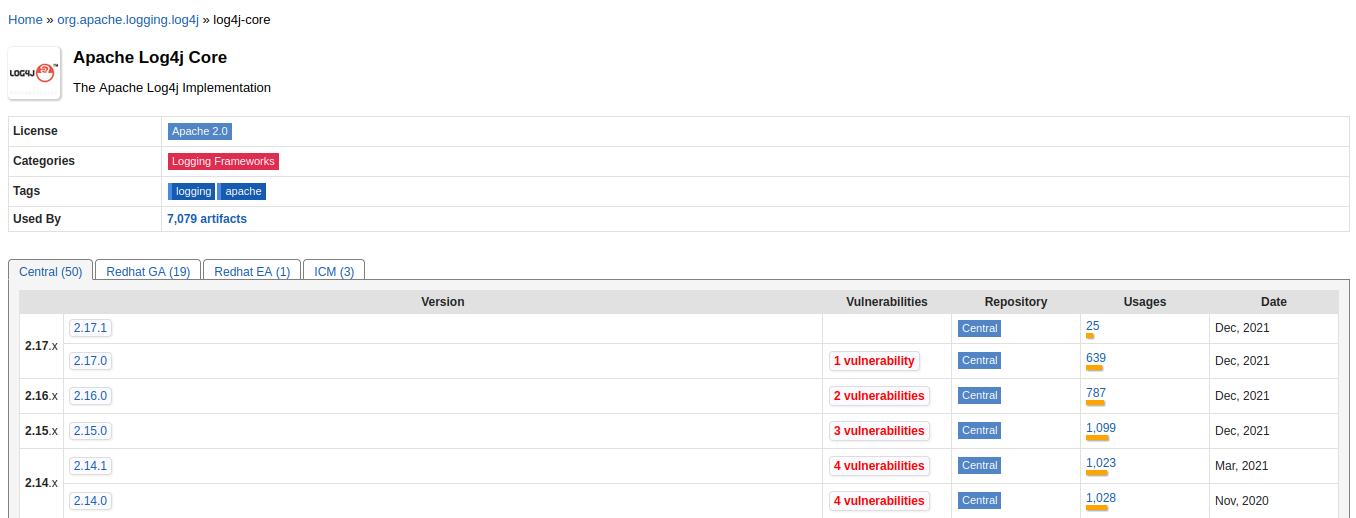
Any Log4J dependency with a version less than 2.17.1 is most likely vulnerable or unmaintained. Maven central repository has a new column with the number of vulnerabilities in each Log4j version.

Log4J 2.17.0 is Vulnerable to RCE. Upgrade to 2.17.1

If you encounter any vulnerable Log4j versions as your direct dependencies defined in your pom file, or in your parent pom file, upgrade them immediately. Remember by defining the following dependency in your pom file, you can override the dependency defined in your parent pom file.

<dependency>
    <groupId>org.apache.logging.log4j</groupId>
    <artifactId>log4j-core</artifactId>
    <version>2.17.1</version>
</dependency>


Log4J 2.17.0 is Vulnerable to RCE. Upgrade to 2.17.1 
Image Credits: Google

A vulnerable Log4J library can be buried under a multi-level dependency tree. If any of your libraries are using a vulnerable dependency, look for their latest fixed versions or talk to your security team.

Read More

Contact Form

Name

Email *

Message *